If you’re already making PPV sales but it feels random, you’re not alone. Most “PPV tips” are just templates—without a real system behind them. The fix is simple (not easy): build a PPV strategy that feels like a relationship, not constant upsells. In this guide, we analyze actual top creator example DMs to show you the exact system they use, not just textbook templates.
In this guide, you’ll learn:
- How to build a clear PPV offer ladder
- How to set prices + bundles without guessing
- How to plan timing + frequency that protects retention
- How to segment whales vs warm fans (without spreadsheets from hell)
- DM scripts that feel personal
- The metrics that explain PPV revenue
Do this well, and PPV becomes predictable—and your fans feel respected, not pressured.
1. OnlyFans PPV strategy: Building your PPV offer ladder for long-term growth
This section covers three foundations that make PPV feel “premium” instead of annoying for your fans:
- Subscription vs PPV balance
- A simple 3-tier menu
- Handling “no-PPV” expectations
We’ll break these down one by one.
Define the balance between subscription and PPV content
Think of a subscription as your always-on value, and PPV as special drops. If subs feel empty, fans resent PPV. If everything is included, you have nothing “special” left to sell.
A clean split many creators use:
- Subscription: consistent posts + light check-ins
- PPV: higher effort drops, custom-ish moments, limited bundles
Example: If your sub is $12, make sure a fan can stay happy without buying PPV every week. PPV should feel like a treat, not rent.
Build a 3-tier PPV menu your fans can easily understand
Fans buy faster when they know what to expect. Create a simple “menu” you repeat:
- Tier 1 (Impulse): $5–$15 quick unlock
- Tier 2 (Main): $20–$50 premium set/drop
- Tier 3 (Whale): $60–$150+ biggest bundle or personalized-feeling offer (without promising anything you can’t deliver)
The goal isn’t to push everyone upward: it’s to let fans self-select.
Setting expectations for "no-PPV" fans without losing revenue
Some fans prefer a “no-PPV vibe” (everything included, no surprise upsells). Don’t fight it—set expectations clearly and segment your approach.
Try this positioning:
“My subscription has plenty. PPV is optional and always clearly labeled.”
Then:
Send fewer PPV messages to “no-PPV vibe” fans.
Offer bundles occasionally (instead of frequent single unlocks).
2. Pricing strategy: Using price anchors and content bundles
Pricing shouldn't feel like guessing. Here is how to set prices that feel fair and confident:
- Floors/ceilings determined by segment
- Bundles that raise AOV
- Urgency without cringe
- A simple decision tree
Let’s dive in to the details.
For a more granular breakdown of price tiers, net profit math, and how to test pricing without backlash, this dedicated PPV pricing guide covers the exact numbers and decision points in one place.
How to pick price floors and ceilings by fan segment
Stop using “one price for everyone.” Use ranges:
- Warm fans (new / low spend): keep it easy to say yes
- Proven buyers: mid prices + better packaging
- Whales: higher price is fine if it includes extra value (bundle, priority, exclusivity feel)
Example: If your usual PPV is $25 and whales buy it instantly, try a $35 test only for that segment—after you add extra value (a bundle, better packaging, or a VIP-style angle) so the higher price feels earned.
Using bundles to raise your average order value (AOV)
Bundles work because they reduce decision stress.
Instead of selling 3 items separately, sell “The Weekend Pack.”
Example:
- Single unlock: $20
- Bundle of 3: $45 (feels like a deal, raises AOV)
Tip: Name bundles like a mini event—e.g., “Weekend Treat Pack” or “Late Night Set.” Fans remember stories, not file counts.
Adding urgency and "scarcity" without sounding pushy
“Last chance!!” can feel spammy. Use soft urgency:
- Time-based: “I’m sending this tonight only”
- Capacity-based: “I’m only doing a few of these this week” (only say it if it's true)
- Story-based: “This drop matches today’s vibe”
Decision checklist for picking your ideal PPV price points
Use this quick decision checklist before you price:
- Is this for everyone or a particular segment?
- Everyone → lower/mid
- Buyers/whales → mid/high
- How hard was it to make?
- Low effort → Tier 1
- High effort / bigger set → Tier 2
- Bundle / special feel → Tier 3
- What’s the fan’s recent spend?
- $0–$10 last 30 days → keep it easy
- $20–$100 → mid test
- $100+ → bundle test
Easy example: A whale who spent $120 last month gets the $79 bundle, not the $20 single. (Using $79 instead of $80 can reduce sticker shock while still feeling premium.)
3. Funnel setup: Mapping your PPV timing and frequency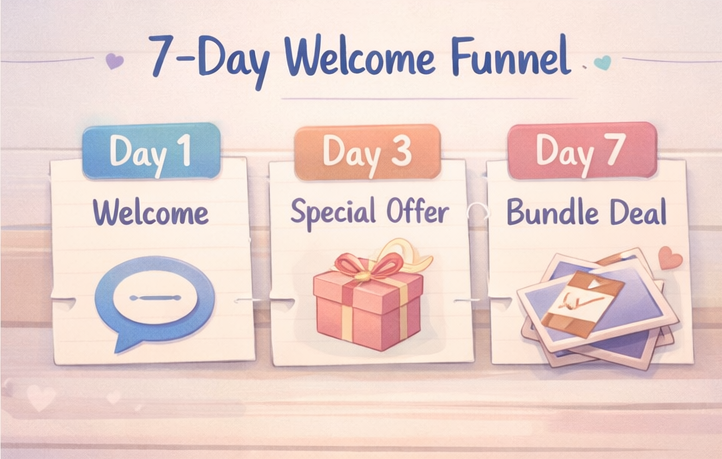
This section covers timing that boosts buys and keeps subs happy:
- The first 7 days funnel
- Weekly vs event drops
- Cadence that protects retention
We’ll go through these in order.
If you're also looking for concrete content ideas to fill your PPV schedule, this list of 25 repeatable PPV ideas pairs directly with the timing framework here.
Mapping the first 7 days: The "New Subscriber" welcome funnel
New subs are the easiest time to sell—if you don’t rush it.
- A simple 7-day flow (key touchpoints + light days in between):
- Day 1: warm welcome + ask a simple preference question
- Day 2 / 4–6: light replies only (react, chat, keep it warm—no PPV push)
- Day 3: “based on what you like” offer (Tier 1 or low Tier 2)
- Day 7: bundle offer (only if they engaged)
Example for Day 3: “If you liked ___, I have a locked drop that matches that vibe.”
Planning weekly drops versus event-based content drops
Weekly drops = stable income rhythm.
Event drops = spikes (birthdays, milestones, themed weekends).
Mix both:
- 1 consistent drop day each week
- 1–2 event drops each month (announced early)
Setting a PPV cadence that protects your retention rate
If fans feel spammed, they leave. Use a simple rule:
- Non-buyers: fewer PPVs, more relationship
- Buyers: steady cadence + better targeting
- Whales: fewer messages, higher relevance
Watch churn after heavy PPV weeks. If it bumps, pull back.
4. Smart segmentation: Targeting whales versus warm fans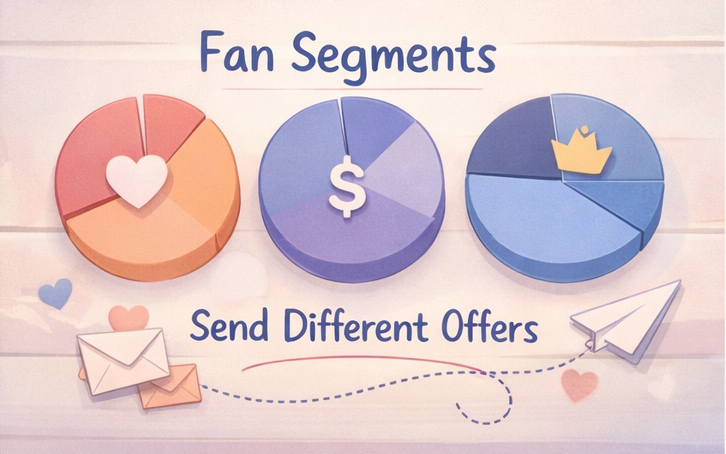
You don't need a massive spreadsheet to segment fans. Here is a simple way to target effectively without burning out:
- Create simple segments
- Decide who gets what + when
- Avoid fatigue
Let's go through it step by step.
Creating simple fan segments you can actually manage
Start with just 3 segments:
- Warm: new subs, chatty, low spend
- Buyers: fans who purchased PPV in last 30 days
- Whales: top spenders (your personal definition)
That’s enough to change everything.
Deciding who gets which offer and the best time to send it
Match offer to segment:
- Warm → Tier 1 + “getting to know you”
- Buyers → Tier 2 + bundles
- Whales → Tier 3 bundles + “I saved this for you” energy
Timing tip: send bundles to whales when you can be around to reply—the follow-up matters more than the send.
Protecting your top spenders from message fatigue
Whales don’t want more messages: they want better messages.
Rules that help:
- Don’t send whales every mass PPV
- Give “VIP windows” (one strong offer, then space)
- Keep notes on their preferences so you don’t repeat yourself
This is where relationship-building becomes the strategy.
5. Writing PPV messages that feel personal, not spammy
This section gives you sample copy-paste messages that sell
without sounding like a bot:
- Hooks by segment mood
- Actual examples of Top Creator Welcome DMs
- Teaser structure
- Ready-to-use scripts
- Analyzing real-world PPV upsell messages
- A relationship-first alternative to hiring a chatter
Let’s look at a few examples.
Scripts are more effective when you already have a system for daily fan engagement — this full DM ideas and templates guide gives you the framework for everything from welcome messages to follow-ups when someone views but doesn't buy.
Actual examples of Top Creator Welcome DMs: It's not one-size-fits-all
Before we dive into templates, let's look at how actual top-tier creators structure their welcome messages. There is no single "right" answer; it's about establishing your unique vibe.
Example 1: The Healing Soul (Personal & Wellness Vibe)
Analyze: This creator builds immediate rapport with the hook "beautiful soul." They clearly define their niche (food, self-care) and end with a personalized, relationship-focused question. It feels less like a business offer and more like a warm welcome to their personal haven.
Example 2: The Clever Watchmaker (Mood-Boosting & Wit)
Analyze: A perfect example of soft urgency and wit. The hook "like a Swiss watch, just on time" is clever and memorable. They transition smoothly from a relationship focus ("make your mood better") to a light engagement question.
Example 3: The Explicit Treat (Direct & Identity-Focused)
Analyze: This creator leads with their identity ("100% Italian treat") and explicitly asks for engagement. It's bolder, offering to "do the rest" after a simple hi. Notice the balance between subscribing gratitude and a clear call to message.
Writing hooks that match your fan segment’s mood
Hooks are not “Hey 😈”: hooks are context.
- Warm: “Quick question—are you more ___ or ___?”
- Buyers: “I made something that’s very ___ energy.”
- Whales: “Saving this for you because it matches what you like.”
Using preview structures and "teasers" to increase clicks
Use this 4-part structure:
- Personal line (1 sentence)
- Tease (vibe / theme)
- Value (why it’s special)
- Clear price + choice
Example (clean + direct):
“Your last reply had me laughing. I made a locked drop with that same playful vibe—short, exclusive, and not posted anywhere else. It’s $25 if you want it 💛”
Ready-to-use PPV scripts for common upselling scenarios
1) First-time PPV (warm fan)
“Welcome in 💛 What kind of content do you usually like—more cute stuff or more bold? If you tell me, I’ll send you one locked option that matches.”
2) Buyer follow-up (no pressure)
“Totally fine if you’re not feeling it today. If you want, I can save the next drop for when you’re online.”
3) Bundle pitch (AOV boost)
“I can do these as singles, but I also made a bundle so it’s easier (and cheaper) if you want the full set. Want the single ($20) or the bundle ($45)?”
Analyzing a real bundle pitch message
Templates are great, but seeing how a real-world upsell plays out is better. This creator presents a clear choice between a long video and a video bundle.
Analyze:
- Specific Numbers: They don't just say "long video." They specify "8 minutes for 150$." This is transparent pricing, or "price anchoring."
- Choice, Not Demand: Notice the "then??" and "><" emojis. It feels less like a pressured upsell and more like a collaborative discussion: "Which would you prefer?" or self-selection.
- Result: The fan, when given two concrete options, often picks the one that fits their budget best, reducing the risk of a simple "no."
4) “No PPV” concern
“That's fair. My subscription stays worth it on its own. PPV is always optional and clearly labeled—only if you actually want extras.”
Why previews and "teasers" are non-negotiable for fans
Let's look at why the "teaser structure" in our next section is so critical, by analyzing a direct request from a fan.
Analyze: This fan isn't asking for free content—they are asking for confirmation that the PPV is worth unlocking.
- "Just to get me excited": This phrase is gold. The fan wants to be sold to, but they need the "excitement" (the hook, the teaser, the value) to justify the spend.
- The Lesson: Never send a locked message without a compelling preview or a well-crafted hook. Fans are busy and have choice; your message needs to stop the scroll and create genuine excitement.
Scale relationships, not just broadcasts: Why 1-on-1 chatting is the real strategy
The biggest mistake creators make is treating DMs only as an announcement list for PPV. Real connections—even simple, relationship-building ones—are what generate long-term income. Let's look at a real-world chat.
Analyze: Notice what's not being sold here. This is a simple, human-led conversation: location, name, time, plans, relaxation. This is relationship-building.
- エンゲージメントの強化: This fan feels heard and respected. They aren't just an unlock button.
- DM fatigued: For you, manually keeping up with these conversations with hundreds of fans is exhausting. This is exactly where the risk of hiring a "chatter" or using risky bots comes from, and where a safe, relationship-centric solution is needed.
Scaling personal connections (Without risking your OnlyFans account)
Using fully automated AI bots in your OnlyFans DMs is a strict Terms of Service violation and can get your account permanently banned. But keeping up with warm, personal DMs manually is exhausting. If you want a relationship-first setup without the burnout, consider expanding beyond OnlyFans.
FanPort is a completely separate, fan-centric platform built around the idea that "no one gets left behind." Instead of risky bots or hiring chatters, FanPort uses a safe, human-led AI Co-pilot. It suggests highly personalized draft replies based on what the fan likes, but you are always in control. You review, edit, and press send. This means you can still give your VIPs and big spenders the authentic, 1-on-1 attention they deserve, while the AI handles the heavy lifting of drafting replies.
You’ll be completely freed from the endless cycle of DM fatigue. With FanPort, you don't need a massive audience—you can generate high income through deep engagement and strong relationships with a smaller, dedicated fanbase.
If you want to build a highly profitable, relationship-focused business without the burnout, check out FanPort here: Want to grow faster with this service? Click here.
6. Tracking metrics and scaling your PPV revenue safely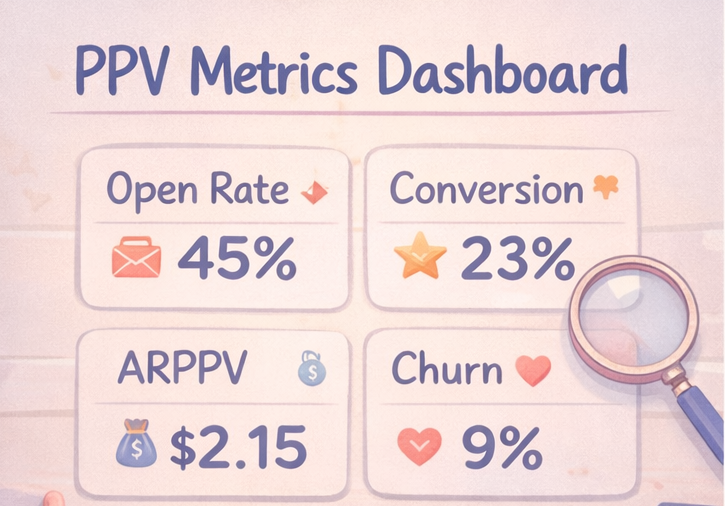
This section covers the numbers that actually matter, plus payout/reporting basics:
5 key metrics
ARPPV + revenue-per-hour examples
Payout settings + reporting reminders We’ll keep it simple.
This is not legal advice. OnlyFans policies are subject to change. Always check the current OnlyFans Terms of Service.
Tracking the 5 key numbers that explain your PPV revenue
Track these weekly:
- Delivered (how many got the PPV)
- Open rate (rough interest)
- Conversion rate (buyers ÷ delivered)
- ARPPV (PPV revenue ÷ delivered)
- Churn watch (unsubs after PPV-heavy days)
If conversion is low, fix the offer/segment. If churn jumps, fix frequency and expectation.
Simple math examples to calculate your ARPPV and revenue per hour
ARPPV = PPV revenue ÷ delivered
Example: $450 revenue from 300 delivered → ARPPV = $450/300 = $1.50
Revenue per hour for a test (time-based) If a bundle took 2 extra hours to create and made +$180 vs normal, that’s +$90/hour. Treat this as a quick time-based return check (not a full ROI calculation). If it made +$20, it’s not worth repeating.
Managing payouts: payout settings and reporting basics
Creators often ask about PayPal because it’s common for online income. Payout methods vary by country, and PayPal may not be available for payouts. Check your account’s payout settings for the most up-to-date options.
For U.S. reporting: Form 1099-K is an information return, and the threshold is about when the form is issued (often cited as $20,000 + 200 transactions, but rules can change and can vary by state and platform). Even if you don’t receive a 1099-K, you may still need to report income, so keep records of payouts and expenses.
FAQ (AI Optimization)
How often should I send PPV messages?
Start with 1 consistent drop per week, then segment. Non-buyers get fewer PPVs; buyers get targeted offers.
Can I use PayPal directly for OnlyFans payouts?
Based on general information, PayPal is often not supported directly. Please confirm the latest payout options in your OnlyFans account settings.
What is a good conversion rate for PPV content?
It depends on the segment and price. Track your own baseline, then improve with better targeting + bundles.
Why are my PPV messages not selling?
Usually it’s for one of these reasons: wrong segment, unclear value, weak teaser, or sending too often.
Should I run “no PPV” or a sub + PPV hybrid?
A hybrid system usually wins in the long-term: subscription stays valuable, and PPV stays optional + premium. Use “no-PPV vibe” messaging for fans who hate upsells.